
Finding the source of an image can feel frustrating, especially when you come across a perfect visual but have no idea where it came from. Whether you’re trying to verify if an image is real, locate a higher-quality version, or check where it’s being used online, the process can quickly become time-consuming.
The good news is that modern image search techniques make this much easier. With the right approach, you can identify image sources, detect edits, and even find visually similar content within seconds. These methods are widely used by marketers, journalists, designers, and researchers to save time and ensure accuracy.
What Is Image Search?
Image search is a method that allows you to search using an image instead of typing text. Instead of describing what you’re looking for, you upload a picture, and the system analyzes it to find matching or similar images across the internet.
This technique is commonly used to:
- Find the original source of an image
- Discover similar or related visuals
- Verify whether an image has been edited
- Locate higher-resolution versions
- Track where an image appears online
Unlike traditional search, image search relies on visual data rather than keywords, making it far more precise in many cases.
How Image Search Works
When you upload an image, advanced systems powered by artificial intelligence and computer vision begin analyzing it. They break the image down into key elements such as colors, shapes, textures, and patterns.
These features are then compared against billions of indexed images. Based on this comparison, the system returns results that are either identical or visually similar.
For example, if you upload a photo of a handbag, the system can recognize its shape, color, and design and show you similar products or even the exact item available online.
Types of Image Search Techniques
There are several ways to search for images, and each method serves a different purpose depending on what you need.
Keyword-Based Image Search
This is the most basic method where you type keywords into a search engine. The results depend on image titles, alt text, and descriptions. It’s useful for general browsing but may not always be accurate.
Reverse Image Search
Reverse image search allows you to upload an image to find its source or duplicates online. It is one of the most effective ways to identify where an image originated or how it has been used.
Visual Similarity Search
This technique helps you find images that look similar in style, layout, or composition. It’s especially useful for designers looking for inspiration or alternatives.
Color and Pattern-Based Search
Some tools allow you to filter images based on specific colors or patterns. This is helpful for branding, design consistency, and product matching.
Object and Face Recognition
Advanced tools can detect objects, faces, landmarks, and even text inside images. This is commonly used in mobile apps and security systems.
How to Find the Source of an Image
If you want to identify where an image came from, the simplest method is reverse image search.
Start by going to an image search platform and uploading the image or pasting its URL. The system will then display similar images along with the websites where they appear. By comparing results, you can often find the original source or the earliest version of the image.
In many cases, using more than one tool gives better accuracy, especially if the image has been edited or cropped.
How to Search Using an Image on Google
Searching by image on Google is quick and user-friendly. You can go to Google Images, click the camera icon, and either upload your image or paste its link.
Once uploaded, Google analyzes the image and shows visually similar results, related content, and possible sources. This method works well for identifying objects, products, and locations.
Using Image Search on Mobile Devices
Mobile image search has become even more powerful with tools like camera-based search. You can simply open your phone’s search app, tap the camera icon, and scan or upload an image.
This allows you to identify objects in real time, translate text, or find products instantly. It’s especially useful when you want quick answers while on the go.
Best Tools for Image Search
There are several reliable tools available, each with its own strengths.
Google Images is widely used for its speed and accuracy. Google Lens is ideal for mobile users and real-time searches. TinEye is known for finding the original source of images, while Bing Visual Search works well for product discovery. Yandex Images is also popular for its strong recognition capabilities.
Using multiple tools often produces the best results, especially when accuracy is important.
How to Check if an Image Is Fake or Edited
Verifying the authenticity of an image is essential, especially in journalism and research. Reverse image search can help you see where the image has appeared before and whether different versions exist.
You can also compare multiple sources, check image metadata, and look for visual inconsistencies such as unusual shadows or mismatched elements. These small details can indicate whether an image has been altered.
Common Mistakes to Avoid
While image search is powerful, certain mistakes can reduce its effectiveness.
Using low-quality or heavily cropped images often leads to poor results. Relying on a single tool can limit accuracy, and ignoring filters may cause irrelevant results to appear. Another common mistake is not checking copyright or usage rights before using an image.
Taking a few extra steps can significantly improve your results.
Practical Uses of Image Search
Image search plays an important role in many industries. In e-commerce, it helps users find products quickly. Journalists use it to verify images and avoid misinformation. Designers rely on it for inspiration, while marketers use it to track content usage.
Students and researchers also benefit from image search when gathering visual information for their work.
The Future of Image Search
Image search is evolving rapidly with advancements in artificial intelligence. Future developments include combining voice and image search, real-time object recognition, and even searching within videos.
These innovations will make visual search faster, smarter, and more interactive, allowing users to find information more naturally.
Conclusion
Image search techniques have transformed the way we find and verify visual content online. Instead of relying on guesswork, you can now upload an image and instantly discover its source, check its authenticity, or explore similar visuals.
By understanding how these techniques work and using the right tools, you can save time, improve accuracy, and make better decisions in both personal and professional tasks at Ad Health Guide.
Frequently Asked Questions
What is reverse image search?
Reverse image search is a method where you upload an image instead of typing text. The system analyzes the image and finds similar or identical matches online.
How can I search using an image on Google?
You can go to Google Images, click the camera icon, and upload your image or paste its URL to see related results.
Is it legal to use images found online?
Not all images are free to use. Always check copyright and usage rights before using any image to avoid legal issues.
How do I find the original source of an image?
Use reverse image search tools to track where the image appears online and identify its earliest version.
Can I find similar images instead of exact matches?
Yes, visual similarity search allows you to discover images with similar styles, layouts, or colors.
How accurate is image search?
Image search is highly accurate when using clear, high-quality images, but results may vary if the image is edited or low resolution.
Note:
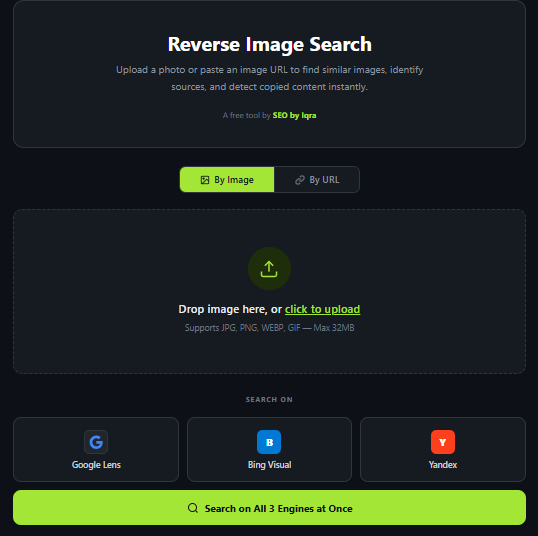
If you want to find where an image came from, you can use this free reverse image search tool. Simply upload your photo or paste an image URL and it will search across Google Lens, Bing Visual, and Yandex all at once.